Expand
# Building a bootloader# Testing custom U-Boot
# Flashing new firmware (again)
# Upgrading the RAM
# The finished device
Upgrading unsupported hardware and installing OpenWrt.
December 31, 2025 by kuba2k2
Posted in Hardware Hacking, Embedded
hacking hardware linux openwrt router solderingA couple of years ago I bought a tiny router for like $1:

The TP-LINK TL-WR702N - it features a single 10/100 Mbps Ethernet port, microUSB for power, and... that's about it. However, with the right software, it can still be useful in many scenarios.
The stock firmware from TP-LINK is... well, basic, it allows to configure the router as a Wi-Fi AP or a client (which then connects the Ethernet port to a Wi-Fi network), and has a few other usual options.
So I figured - why not try installing OpenWrt on that thing?
Now, here's the general problem - this device has only 2 MiB of flash and 16 MiB of DDR RAM. That's not enough to run OpenWrt, even if you use an ancient version.
There are several similar TP-LINK routers, namely the TL-WR703N (same case and PCB, twice the flash/RAM, extra USB) and the TL-WR710N (two Ethernet ports, 8 MiB flash, 32 MiB RAM). These two models used to be supported in previous versions of OpenWrt, but support was dropped a few years ago due to insufficient memory resources.
Thankfully, the TL-WR703N page contains some instructions about modding the device to add more flash and RAM. This allows to increase the storage to 16 MiB, as well as having at most 64 MiB of RAM - now, that's already plenty!
I decided to give this a try with my TL-WR702N. Since the devices are no longer supported, there are no prebuilt OpenWrt images, and there are no exact steps for building one - I'll have to figure it out myself.
The OpenWrt Wiki outlines the build process pretty nicely - the toolchain is based on Buildroot, which should make it easy.
Having cloned the OpenWrt repo, I ran the feed update scripts (whatever they do...).
mkdir -p /work/openwrt && cd /work/openwrt
git clone https://github.com/openwrt/openwrt.git
cd openwrt
git checkout v24.10.5
./scripts/feeds update -a
./scripts/feeds install -a
The TL-WR702N has an Atheros AR9331 CPU, which is based on the ath79 architecture, so I downloaded the default config used for that target:
wget https://mirror-03.infra.openwrt.org/releases/24.10.5/targets/ath79/generic/config.buildinfo
mv config.buildinfo .config
make menuconfig
To my surprise, the latest release still supported the TP-Link TL-WR710N v2.1 profile, which just wasn't enabled by default. Even better, digging through the device trees revealed a ar9331_tplink_tl-wr703n.dts file for the TL-WR703N!
First, I created a new device profile based on the existing one:
tee >> target/linux/ath79/image/generic-tp-link.mk <<EOF
define Device/tplink_tl-wr702n
  \$(Device/tplink-16mlzma)
  SOC := ar9331
  DEVICE_MODEL := TL-WR702N
  DEVICE_VARIANT := v1
  DEVICE_PACKAGES := kmod-usb-chipidea2 kmod-usb-ledtrig-usbport
  TPLINK_HWID := 0x07020001
  SUPPORTED_DEVICES += tl-wr702n
  DEFAULT := n
endef
TARGET_DEVICES += tplink_tl-wr702n
EOF
Then, I proceeded to create a copy of the device tree. Since I used the 16mlzma configuration (as I'll be installing a 16 MiB flash chip), I also needed to create a new device tree with an updated flash layout.
cd target/linux/ath79/dts/
cp ar9331_tplink_tl-wr703n_tl-mr10u.dtsi ar9331_tplink_tl-wr702n-16m.dtsi
sed -i s/0x3d0000/0xfd0000/g ar9331_tplink_tl-wr702n-16m.dtsi
sed -i s/0x3f0000/0xff0000/g ar9331_tplink_tl-wr702n-16m.dtsi
sed -i s/@3f0000/@ff0000/g ar9331_tplink_tl-wr702n-16m.dtsi

cp ar9331_tplink_tl-wr703n.dts ar9331_tplink_tl-wr702n.dts
sed -i s/WR703/WR702/g ar9331_tplink_tl-wr702n.dts
sed -i s/tplink,tl-wr703n/tplink,tl-wr702n/g ar9331_tplink_tl-wr702n.dts
sed -i s/tl-wr703n_tl-mr10u.dtsi/tl-wr702n-16m.dtsi/g ar9331_tplink_tl-wr702n.dts
And finally, I proceeded to build the firmware image:
export FORCE_UNSAFE_CONFIGURE=1 # I was running as 'root' in a Docker container
make -j12 defconfig download clean world
As a safety measure, I wired up a USB-TTL adapter to the device's UART test points, and captured a boot log of the original firmware. It runs vxWorks - not Linux. Here's the an excerpt of the log:
         ________  ________             __      __  ____   _  __   ___
        |________||   ___  |           |  |    |  ||    \ | ||  | /  /
           |  |   |  |___| |   __ __   |  |    |  ||     \| ||  |/  /
           |  |   |   _____|  |__ __|  |  |___ |  || |\     ||      \
           |__|   |__|                 |______||__||_| \____||__|\___\


                            Software Platform for MIPS
Creation date: Aug 24 2011, 18:58:10 ([email protected])
Copyright(C) 2001-2010 by TP-LINK TECHNOLOGIES CO., LTD.
CPU: AR9330: AP121 Board
CPU freq: 400 MHZ
SDRAM size: 8 MB
ipaddr:192.168.1.1
serverip:192.168.1.100
file:vxWorks.img

`L/
Attaching interface lo0... done
Rx clbufs 768 each of size 1756
eth_rx_netpool_init: allocated, pDmaBuf=0x80637910, buffend = 80782514
ATHRS26: resetting s26
ATHRS26: s26 reset done
eth_rx_netpool_init: done already!
Attached IPv4 interface to mirror unit 0
Press Ctrl+C to stop auto-boot...
 0
auto-booting...
Uncompressing...done
Starting at 0x80001000...

Attaching interface lo0... done
Rx clbufs 768 each of size 1756
eth_rx_netpool_init: allocated, pDmaBuf=0x80e20960, buffend = 80f6b564
ATHRS26: resetting s26
ATHRS26: s26 reset done
eth_rx_netpool_init: done already!
Attached IPv4 interface to mirror unit 0
usrAppInitEx: 137: GPIO_OE = c00081d
usrAppInitEx: 138: CP0 CONFIG = 80208483
usrAppInitEx: 139: CP0 CONFIG1 = 9ee3519e

-->starting wireless...
APCFG task id 80c5e450
sysWlanInit ...
Create WLAN event task tWLANEventTask
Create mem partion 0x80c3fc20 for size 73728
Boostrap clock 25MHz
ar9300RadioAttach: Need analog access recipe!!
Restoring Cal data from Flash
ant_div_control1 = 0x9
ath_get_caps[4303] rx chainmask mismatch actual 1 sc_chainmak 0
ath_get_caps[4278] tx chainmask mismatch actual 1 sc_chainmak 0
Create OS_MESGQ Successfully at 0x80c14c60
osifp->queue_head = 0x80c14f60
ag7240MemInit: allocated, dmabuf=0x80b4e2c0, buffend = 80c071c4
Entering Task Loop
Entering WLAN event Task Loop
sending message 80b2f540,24
TDDP: Now listening client request.
tddp is running.
wmosSemMCreate() pMud->mudDataSem:-2135960768


                            Software Platform for MIPS
  Copyright(C) 2001-2010 by TP-LINK TECHNOLOGIES CO., LTD.
  Creation date: Mar 14 2013, 11:00:05
# Starting WLAN !!!!
AP_STARTMODE=repeater-ind
AP_ENABLE=1
ATH_COUNTRYCODE=840
wlan_vap_create : enter. devhandle=0x803c6430, opmode=IEEE80211_M_HOSTAP, flags=0x1
wlan_vap_create : exit. devhandle=0x803c6430, opmode=IEEE80211_M_HOSTAP, flags=0x1.
osif_ioctl_create_vap: vap 0x80ffe960 vap->iv_unit 0
ieee80211_end_load: load done
ath0 end flag = 0x00028802
default
default
default
IEE80211-FREQ IOCTL vap 0x80ffe960 0,0,0
AP_CHMODE=11NGHT40PLUS

WLAN IOCTL AP_CHMODE=11NGHT40PLUS=11NGHT20=11NGHT40PLUS=1003
IEE80211-MODE IOCTL 1,11NGHT40PLUS,13
set mode 11,-2130709148,6
set mode retv 0
[...]
Interrupting the boot process reveals a pretty limited bootloader:
Press Ctrl+C to stop auto-boot...
Stop auto-boot...
#
#
# help
command         description
-------------------------------
?               print all commands
flash           flash [read | write | erase | modify] offset dataAddr len
go              start application at address 'addr':go [addr]
help            print all commands
md              memory display, limited 16KB:md start_addr len
mm              memory modify:mm addr value
printenv        print environment variables
reboot          reboot the systerm
setenv          [ipaddr | ipmask | serverip | file | delay]
tftp            tftp [host] [get | put] [source] [destination] [-d]
update          update [boot | vxWorks] [host] [image]
ping            ping host
I'm not really sure if that's even U-Boot or something else, but that shouldn't matter - as long as it can boot the OpenWrt image, it should be fine.
To replace the flash chip with a 16 MiB one, I first removed the old one using a hot air gun. Since it contains the bootloader, MAC address and Wi-Fi calibration data, I also needed to dump its contents, using something like the CH341A adapter.
That's when I found the first issue - the bootloader wasn't U-Boot - which meant it didn't support booting into OpenWrt at all.
Thankfully, the OpenWrt Wiki didn't fail me here either - as it turned out, there was a ready-to-use U-Boot 1.1.4 modification by @pepe2k. Among other things, it adds a web-based console for upgrading the firmware on-the-fly, and it supports flash chips larger than the stock ones.
The particular flash chip I wanted to use (ISSI 25LP128, salvaged from a dead laptop) wasn't on the list of supported devices, but since it supported SFDP (Serial Flash Discoverable Parameter), I figured the bootloader should recognize it properly anyway.
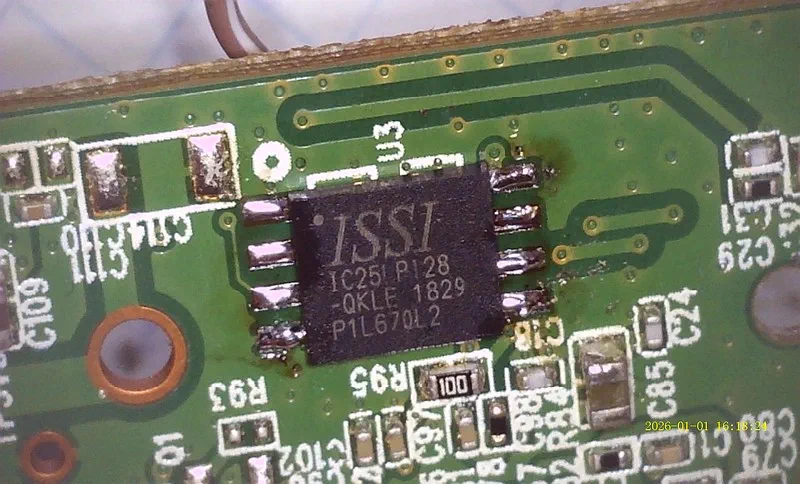
Having a bootloader image - one of the prebuilt releases (uboot_for_tp-link_tl-wr703n.bin) - I flashed the new chip and soldered it into the router.
 Flash chip (25LP128) soldered onto the router's PCB
After plugging it in, this is what I saw on UART:
*********************************************
*   U-Boot 1.1.4  (Nov 19 2014, 09:43:51)   *
*********************************************

AP121 (AR9331) U-Boot for TL-WR703N

DRAM:   32 MB DDR 16-bit
FLASH:  Unknown type (using only 4 MB)

Please, send request to add support
for your FLASH - JEDEC ID: 0x9D6018

CLOCKS: 400/400/200/33 MHz (CPU/RAM/AHB/SPI)

## Error: MAC is invalid, using fixed!

LED on during eth initialization...

## Error: MAC address in FLASH is invalid, using fixed!
## Error: MAC address in FLASH is invalid, using fixed!
Hit any key to stop autobooting:  0

uboot>
Worked just fine! The bootloader didn't detect the flash chip, however, so flashing the ART partition (Wi-Fi calibration) probably wasn't possible (since it resides at the end of the flash memory). Still, I should be able to flash it later on, from within OpenWrt. The RAM size was also wrong - at this point the device still only had 16 MiB.
Armed with a working installation of U-Boot, I started the built-in web server, which should allow to flash the entire OpenWrt firmware (which has just finished compiling... after a few hours). After connecting it to my local Ethernet network, I could even see the flashing UI.
uboot> setenv ipaddr 192.168.0.100
uboot> httpd
Ethernet mode (duplex/speed): 1/100 Mbps
HTTP server is starting at IP: 192.168.0.100
HTTP server is ready!

Request for: /index.html
Request for: /style.css
Request for: /
 Firmware update page at 192.168.0.100
The build generated three different files, and I wasn't sure which one to choose - though flashing the wrong one shouldn't damage anything anyway:
openwrt-24.10.5-ath79-generic-tplink_tl-wr702n-initramfs-kernel.bin          6,280,318 B
openwrt-24.10.5-ath79-generic-tplink_tl-wr702n-squashfs-factory.bin         16,252,928 B
openwrt-24.10.5-ath79-generic-tplink_tl-wr702n-squashfs-sysupgrade.bin       6,619,953 B
The factory image was pretty close to 16 MiB (0xF80000), so I tried that first.
 Flashing error
No dice. The U-Boot console was clear enough - Upload file size: 16252928 bytes; ## Error: file too big! - flashing anything above 4 MiB was not possible, as the chip's real size was still unknown. I needed a new build of the bootloader, with support for the chip's JEDEC ID.
The U-Boot modification by @pepe2k was pretty well documented, so building turned out to be really easy - just a few commands:
cd /work/openwrt/

wget https://archive.openwrt.org/releases/17.01.0/targets/ar71xx/generic/lede-sdk-17.01.0-ar71xx-generic_gcc-5.4.0_musl-1.1.16.Linux-x86_64.tar.xz
tar -xavf lede-sdk-17.01.0-ar71xx-generic_gcc-5.4.0_musl-1.1.16.Linux-x86_64.tar.xz

export TOOLCHAIN_DIR=/work/openwrt/lede-sdk-17.01.0-ar71xx-generic_gcc-5.4.0_musl-1.1.16.Linux-x86_64/staging_dir/toolchain-mips_24kc_gcc-5.4.0_musl-1.1.16
export PATH=$TOOLCHAIN_DIR/bin:$PATH

git clone https://github.com/pepe2k/u-boot_mod
cd u-boot_mod/
make tp-link_tl-wr703n_v1
For some reason, the build process created a ~70 KiB image, instead of the sub-64 KiB size the prebuilt image had. It also assumed that the maximum size was 123 KiB, which I guess was fine - that would be 0x1EC00 bytes, and the MAC address supposedly is at 0x1FC00, so it should all fit.
 Attempting to flash new U-Boot
Well, not quite - I got a similar size error:
Upload file size: 125952 bytes
## Error: wrong file size, should be: 65536 bytes!
The old 64K bootloader didn't allow flashing anything larger. Browsing through the GitHub repo, I noticed that the prebuilt release was from 2014, while the master branch included commits all the way to 2017! This also explained why the flash detection didn't work - it was simply introduced later on.
By using make tp-link_tl-wr703n_v1 IMG_SIZE=64 I could see the image was about ~5 KiB too large.
root@buildhost:/work/openwrt/u-boot_mod# make tp-link_tl-wr703n_v1 IMG_SIZE=64
Removing configuration...
Preparing configuration for target: tp-link_tl-wr703n_v1

  Device vendor/model:  TP-Link TL-WR703N v1
  Custom recovery web:  no
  Image size limit:     64 KB
  Default FLASH size:   4 MB
  GPIO reset button:    11
  Button active low:    n/a
  LZMA compression:     yes
  RAM-loadable only:    no

Preparing web server files...

[...]

Building lzma host utility...

Compressing U-Boot image lzma_host...
Preparing LZMA compressed U-Boot image u-boot.lzimg...
    Image Name: U-Boot 1.1.4-09c39dda-clean
       Created: Thu Jan  1 14:27:48 2026
    Image Type: MIPS Linux Firmware (lzma compressed)
     Data Size: 58397 Bytes = 57.03 kB = 0.06 MB
  Load Address: 0x80010000
   Entry Point: 0x80010000

Merging bootstrap.bin with u-boot.lzimg...
    Bootstrap size: 11784 Bytes
   LZMA image size: 58461 Bytes
  Total image size: 70245 Bytes

Copying compiled image...
Checking size of the image...

  ======================
  IMAGE SIZE IS TOO BIG!
  ======================

make: *** [Makefile:227: tp-link_tl-wr703n_v1] Error 1
To trim the size down, I disabled some commands that weren't necessary - in u-boot/include/configs/qca9k_common.h:
//#define CONFIG_NETCONSOLE    1
//#define CONFIG_CMD_DATE
//#define CONFIG_CMD_GPIO
//#define CONFIG_CMD_IMI
//#define CONFIG_CMD_MEMORY
//#define CONFIG_CMD_SNTP
And that did the trick - the next build was 65,246 bytes, which just about fit in the required 64K. For some reason, the output file was still 123 KiB in size, so I ended up modifying the main Makefile with @$(call build,64,1).
Before writing the newly-compiled bootloader to flash (and possibly bricking the device completely, requiring removal of the flash chip...) I wanted to test if it still worked. Fortunately, the IMG_RAM=1 option, when passed to make, built U-Boot in a way so that it could be booted over TFTP.
Using tftpd64 I started a TFTP server on my PC (192.168.0.120) and pointed it to the u-boot_mod__tp-link_tl-wr703n_v1__20260101__git_master-09c39dda__RAM-LOAD-ONLY.bin file.
The file downloaded quickly, and using go I was able to start the new bootloader!
uboot> setenv serverip 192.168.0.120
uboot> setenv ipaddr 192.168.0.100
uboot> tftpboot 0x80100000
Ethernet mode (duplex/speed): 1/100 Mbps

TFTP from IP: 192.168.0.120
      Our IP: 192.168.0.100
    Filename: 'firmware.bin'
Load address: 0x80100000
       Using: eth0

     Loading: #############################

TFTP transfer complete!

Bytes transferred: 147244 (0x23f2c)
uboot> go 0x80100000
***************************************
*                                     *
*             RAM VERSION             *
*                                     *
***************************************
*     U-Boot 1.1.4-09c39dda-dirty     *
*          Build: 2026-01-01          *
***************************************

** Warning: SPI NOR FLASH in bank #1 is
   unknown, JEDEC ID: 0x9D6018

   Information provided in SFDP:
   - FLASH size: 16 MB
   - erase sector size: 64 kB
   - erase sector command: 0xD8

** Warning: bad env CRC, using default,
   use 'saveenv' to save it in FLASH

  BOARD: TP-Link TL-WR703N v1
    SOC: AR9330 rev. 1
    CPU: MIPS 24Kc
    RAM: 15 MB DDR1 16-bit CL3-3-3-8
  FLASH: 16 MB Unknown unknown model
    MAC: XX:XX:XX:XX:XX:XX
 CLOCKS: CPU/RAM/AHB/SPI/REF
         400/400/200/ 33/ 25 MHz

Hit any key to stop booting:  0

u-boot>
With this, I could use the web UI again to write the new 64K bootloader to flash:
uboot> httpd
HTTP server is starting at IP: 192.168.0.55
HTTP server is ready!

Request for: /uboot.html
Request for: /style.css
Data will be downloaded at 0x80800000 in RAM
Upgrade type: U-Boot
Upload file size: 65536 bytes
Loading: #######################################
         #######

HTTP upload is done! Upgrading...

****************************
*     U-BOOT UPGRADING     *
* DO NOT POWER OFF DEVICE! *
****************************

Executing: erase 0x9F000000 +0x10000; cp.b 0x80800000 0x9F000000 0x10000

Erase FLASH from 0x9F000000 to 0x9F00FFFF in bank #1
Erasing: #

Erased sectors: 1

Copying to FLASH...
Writting at address: 0x9F000000

Done!

HTTP ugrade is done! Rebooting...

***************************************
*     U-Boot 1.1.4-09c39dda-dirty     *
*          Build: 2026-01-01          *
***************************************

[...]

Hit any key to stop booting:  0

u-boot>
This time it worked flawlessly!
I started the web UI again to write the sysupgrade image (since it was pretty much the same as factory, just without ~10 MiB of padding, which wouldn't fit in the RAM...). This time it didn't complain about size being too large (since the 16 MiB flash was detected properly), but still failed to write:
****************************
*    FIRMWARE UPGRADING    *
* DO NOT POWER OFF DEVICE! *
****************************

Executing: erase 0x9F020000 +0x650331; cp.b 0x80800000 0x9F020000 0x650331

Erase FLASH from 0x9F020000 to 0x9F67FFFF in bank #1
Erasing: #######################################
         #######################################
         ########################

Erased sectors: 102

## Error: unknown command 'cp.b' - try 'help'

## Error: HTTP ugrade failed!
Turns out that by disabling CONFIG_CMD_MEMORY I removed one of the required commands for web upgrade... okay then, I restored that flag to normal and disabled CONFIG_CMD_LOADB and CONFIG_CMD_RSTBYWDT instead, to make it still fit in the required 64K.
Having verified that the new build worked (using TFTP and RAM-boot), I rebooted back to the on-flash bootloader (master branch, new build, without CONFIG_CMD_MEMORY).
After launching the web UI again to flash the new bootloader... I ended up erasing it completely from flash.
Data will be downloaded at 0x80800000 in RAM
Upgrade type: U-Boot
Upload file size: 65536 bytes
Loading: #######################################
         #######

HTTP upload is done! Upgrading...

****************************
*     U-BOOT UPGRADING     *
* DO NOT POWER OFF DEVICE! *
****************************

Executing: erase 0x9F000000 +0x10000; cp.b 0x80800000 0x9F000000 0x10000

Erase FLASH from 0x9F000000 to 0x9F00FFFF in bank #1
Erasing: #

Erased sectors: 1

## Error: unknown command 'cp.b' - try 'help'

## Error: HTTP ugrade failed!
It erased the bootloader from flash, then failed to copy the new one because of missing cp.b command. The device was still running, but any attempt to reboot it would just brick it permanently.
I had to choose my steps carefully - and thankfully it was possible to bring it out of life support:
u-boot> setenv serverip 192.168.0.120
u-boot> setenv ipaddr 192.168.0.100
u-boot> tftpboot 0x80100000
[...]
Bytes transferred: 142932 (0x22e54)
u-boot> go 0x80100000
## Starting application at 0x80100000...
[...]
u-boot> help
cp         - memory copy
[...]
Phew, the cp.b command was there. Since U-Boot was running at 0x80100000, I figured the 0x80800000 address was safe to write to. Using tftpboot I got a copy of U-Boot for flashing, erased the partition, and wrote it:
u-boot> setenv serverip 192.168.0.120
u-boot> setenv ipaddr 192.168.0.100
u-boot> tftpboot 0x80800000 flash.bin
Ethernet mode (duplex/speed): 1/100 Mbps

TFTP from IP: 192.168.0.120
      Our IP: 192.168.0.100
    Filename: flash.bin
       Using: eth0
Load address: 0x80800000

     Loading: #############

TFTP transfer complete!

Bytes transferred: 65536 (0x10000)
u-boot> md.b 0x80800000
80800000: 10 00 00 FF 00 00 00 00 10 00 00 FD 00 00 00 00    ................
80800010: 10 00 01 75 00 00 00 00 10 00 01 73 00 00 00 00    ...u.......s....
80800020: 10 00 01 71 00 00 00 00 10 00 01 6F 00 00 00 00    ...q.......o....
80800030: 10 00 01 6D 00 00 00 00 10 00 01 6B 00 00 00 00    ...m.......k....
u-boot> erase 0x9F000000 +0x10000
Erase FLASH from 0x9F000000 to 0x9F00FFFF in bank #1
Erasing: #

Erased sectors: 1

u-boot> cp.b 0x80800000 0x9F000000 0x10000
Copying to FLASH...
Writing at address: 0x9F000000

Done!

u-boot> md.b 0x9F000000 0x1000
9F000000: 10 00 00 FF 00 00 00 00 10 00 00 FD 00 00 00 00    ................
9F000010: 10 00 01 75 00 00 00 00 10 00 01 73 00 00 00 00    ...u.......s....
9F000020: 10 00 01 71 00 00 00 00 10 00 01 6F 00 00 00 00    ...q.......o....
9F000030: 10 00 01 6D 00 00 00 00 10 00 01 6B 00 00 00 00    ...m.......k....
u-boot>
After verifying that the entire on-flash image was correct, I simply rebooted the device - fortunately it wasn't bricked. Flashing the sysupgrade image again worked this time, and booted right into Linux:
***************************************
*     U-Boot 1.1.4-09c39dda-dirty     *
*          Build: 2026-01-01          *
***************************************

** Warning: SPI NOR FLASH in bank #1 is
   unknown, JEDEC ID: 0x9D6018

   Information provided in SFDP:
   - FLASH size: 16 MB
   - erase sector size: 64 kB
   - erase sector command: 0xD8

** Warning: bad env CRC, using default,
   use 'saveenv' to save it in FLASH

  BOARD: TP-Link TL-WR703N v1
    SOC: AR9330 rev. 1
    CPU: MIPS 24Kc
    RAM: 16 MB DDR1 16-bit CL3-3-3-8
  FLASH: 16 MB Unknown unknown model
    MAC: XX:XX:XX:XX:XX:XX
 CLOCKS: CPU/RAM/AHB/SPI/REF
         400/400/200/ 25/ 25 MHz

Hit any key to stop booting:  0

Booting image from 0x9F020000...

   Vendor/image name:    OpenWrt r29087-d9c5716d1d
   Hardware ID:          0x7020001
   Whole image size:     15.5 MB (16252928 bytes)
   Kernel size:          2.5 MB (2609931 bytes)
   Rootfs size:          3.8 MB (3997932 bytes)
   Kernel load address:  0x80060000
   Kernel entry point:   0x80060000

   Header CRC...  skipped
   Data CRC...    skipped

Uncompressing Kernel... OK!
Starting kernel...

[    0.000000] Linux version 6.6.119 (builder@buildhost) (mips-openwrt-linux-musl-gcc (OpenWrt GCC 13.3.0 r29087-d9c5716d1d) 13.3.0, GNU ld (GNU Binutils) 2.42) #0 Wed Dec 17 21:08:22 2025
[    0.000000] printk: bootconsole [early0] enabled
[    0.000000] CPU0 revision is: 00019374 (MIPS 24Kc)
[    0.000000] MIPS: machine is TP-Link TL-WR702N
[    0.000000] SoC: Atheros AR9330 rev 1
[...]
[    2.691012] init: Console is alive
[    2.693584] init: - watchdog -
[    6.729057] kmodloader: loading kernel modules from /etc/modules-boot.d/*
[    7.018353] usbcore: registered new interface driver usbfs
[    7.022621] usbcore: registered new interface driver hub
[    7.027953] usbcore: registered new device driver usb
[    7.348197] gpio_button_hotplug: loading out-of-tree module taints kernel.
[    7.794011] ci_hdrc ci_hdrc.0: EHCI Host Controller
[    7.797536] ci_hdrc ci_hdrc.0: new USB bus registered, assigned bus number 1
[    7.828830] ci_hdrc ci_hdrc.0: USB 2.0 started, EHCI 1.00
[    7.834483] hub 1-0:1.0: USB hub found
[    7.838420] hub 1-0:1.0: 1 port detected
[    7.850687] kmodloader: done loading kernel modules from /etc/modules-boot.d/*
[    8.158423] init: - preinit -
...and then it just got stuck there. No console, no network connectivity, nothing was happening.
Occasionally I saw something like strings: standard output: Broken pipe, which could indicate lack of RAM - after all, it was still running with just 16 MiB. After about 10 minutes, it was clear enough:
[  662.943304] init invoked oom-killer: gfp_mask=0x140cca(GFP_HIGHUSER_MOVABLE|__GFP_COMP), order=0, oom_score_adj=0
[  662.952217] CPU: 0 PID: 1 Comm: init Tainted: G           O       6.6.119 #0
[...]
[  663.253050] oom-kill:constraint=CONSTRAINT_NONE,nodemask=(null),global_oom,task_memcg=/,task=board_detect,pid=443,uid=0
[  663.263831] Out of memory: Killed process 443 (board_detect) total-vm:1704kB, anon-rss:352kB, file-rss:4kB, shmem-rss:0kB, UID:0 pgtables:20kB oom_score_adj:0
For the RAM upgrade, I chose an MT46V32M16TG-5B chip, which supposedly had 64 MiB of memory at 400 MHz. I removed it from an old GOODRAM GR400D64L3/512 module, which had 8 of these chips.
 Both the old and new RAM chips, unsoldered
Cleaning up with a solder wick gave me a pretty satisfying footprint, onto which I then soldered the new RAM chip.
 Cleaned up footprint
 RAM chip soldered on the board
I call that a success - it worked perfectly on the first boot!
***************************************
*     U-Boot 1.1.4-09c39dda-dirty     *
*          Build: 2026-01-01          *
***************************************
[...]
  BOARD: TP-Link TL-WR703N v1
    SOC: AR9330 rev. 1
    CPU: MIPS 24Kc
    RAM: 64 MB DDR1 16-bit CL3-3-3-8
  FLASH: 16 MB Unknown unknown model
[...]
Uncompressing Kernel... OK!
Starting kernel...

[    0.000000] Linux version 6.6.119 (builder@buildhost) (mips-openwrt-linux-musl-gcc (OpenWrt GCC 13.3.0 r29087-d9c5716d1d) 13.3.0, GNU ld (GNU Binutils) 2.42) #0 Wed Dec 17 21:08:22 2025
[...]

BusyBox v1.36.1 (2025-12-17 21:08:22 UTC) built-in shell (ash)

  _______                     ________        __
 |       |.-----.-----.-----.|  |  |  |.----.|  |_
 |   -   ||  _  |  -__|     ||  |  |  ||   _||   _|
 |_______||   __|_____|__|__||________||__|  |____|
          |__| W I R E L E S S   F R E E D O M
 -----------------------------------------------------
 OpenWrt 24.10.5, r29087-d9c5716d1d
 -----------------------------------------------------
=== WARNING! =====================================
There is no root password defined on this device!
Use the "passwd" command to set up a new password
in order to prevent unauthorized SSH logins.
--------------------------------------------------
root@(none):~#
After running udhcpc -i br-lan (since the router was plugged into my LAN) I could log into the LuCI web panel:
 Latest OpenWrt running on TL-WR702N
One thing that didn't work was installing packages, which require kernel modules. Apparently my kernel was built from a different revision (commit hash), and the dependencies were pinned to the particular version using a "virtual" kernel package. Since the Linux release (6.6.119) was the same, I just replaced the package with OpenWrt's official one (kernel_6.6.119~35ef4dd36891d37023436baa842fa311-r1_mips_24kc.ipk) as a workaround.
As a bonus, I added an FT232BL-based USB-TTL bridge inside the router's enclosure - for easy access to the UART console. In fact, I wasn't the first one with such an idea - people do all kinds of crazy things with these tiny routers - just see TL-WR703N on OpenWrt Wiki.
Side note: to get working Wi-Fi, I also had to flash the ART partition (last 64K of the flash) using U-Boot's web UI. After this final step, the device was fully functional.
 The final product
#
OpenWrt support
#
Building firmware
#
Dumping stock firmware
#
Flashing a bootloader
#
Flashing OpenWrt